
With prices on the rise, we’re all looking at ways we can save money and avoid breaking the bank. We’re here to answer all your questions on gaming PCs and energy consumption. Showing you the average electricity cost, what it means to create an energy-efficient PC, and some top tricks to reduce your energy consumption.


How Much Electricity Does a Gaming PC Use Key Takeaways
- A mid-range gaming PC with a 500W 80 PLUS Gold PSU can cost around £9.18 per month or £111.57 per year when gaming for three hours a day.
- Gaming PCs with higher-powered hardware and a 1000W PSU can potentially cost almost twice as much to run, highlighting the impact of powerful components on electricity consumption.
- Choosing an efficient PSU, low-TDP CPU, SSD, and energy-efficient monitor can help reduce power consumption without sacrificing gaming performance.
- Gamers can reduce electricity usage by closing background applications, adjusting Windows power settings, switching off RGB lighting, and avoiding unnecessary standby power.
- Regularly cleaning dust from your gaming PC can help prevent overheating and performance issues, while efficient hardware and sensible power settings can contribute to a lower energy bill.
What is The Average Electricity Usage of a Gaming PC?
We’ve calculated the average cost of a gaming PC per month and year.
As of 2026, research performed by MIDIA suggests the average person enjoys playing games between 7.5 and 8.5 hours a week. That roughly equals 1.2 hours per day for the average player. With that said, we both know that you play way more than that. Let’s call it 3 hours minimum (and that’s probably underestimating your gaming prowess). This means that for 1095 hours of the year, you are engaging in boss battles, climbing your way to victory, and discussing tactics with your teammates.
Currently, the average cost of electricity is 26.20p/kWh. If you play games for 3 hours a day and utilise an 80 PLUS Gold standard PSU, it could cost you up to nearly £9.18 a month to run your computer. This would equal an average of £111.57 a year. These calculations operate on the assumption that this gaming PC uses mid-range hardware. For those of you, however, who have a high-performance PC with a 1000W PSU, you can almost double this figure – costing you (or the parents) almost £191.26!
How Much Power Does Each Component Need?
The table below shows a complete breakdown of the power consumption of a basic list of PC components.
| Component | Power Usage |
|---|---|
| CPU | 65 – 250W |
| Motherboard | 30 – 100W |
| PSU | 200 – 800W |
| GPU | 100 – 450W |
| HDD | 0.7 – 9W |
| SSD | 3 – 10W |
| RAM | 2 – 5.5W |
| Case Fans | 2 – 6W |
The Importance of an Energy-Efficient PC
The best way to potentially help reduce the costs of running a gaming PC is to invest in energy-efficient hardware. This will help to reduce your overall power consumption, helping to save money and lower your household’s energy usage.
Creating an energy-efficient PC doesn’t mean you have to compromise on performance or utilise the latest cutting-edge hardware. With an energy-efficient computer, you can still enjoy the same powerful performance, vivid visuals, ultra-fast speeds, immersive gaming, and a smaller electricity bill!
Our Top Tips to Help Reduce Your Energy Consumption
We’re all battling the rising cost of energy so we’ve put together some of our top tips to help reduce your consumption.
Make Sure You Aren’t Leaving Things on Standby
It might seem small but leaving things on standby will affect your energy usage. Get into the habit of turning off all your ‘vampire devices’, such as the television, consoles, and phone chargers at the plug when you aren’t using them. This can help save you a few extra pounds on your electricity bill.
You can utilise USB hubs and extensions to assist with this too.

Streamplify HUB DECK 5 RGB USB Hub 5-port USB Hub With Power Charging
CC-004-SM
£41.99 GBP £ 9.95 GBP
-76.3%(incl. VAT)
FREE SHIPPING
in stock
ADD TO BASKET
IcyBox 13 Port USB 3.0, 1 USB Charging Port Hub
HD-13P-BT
£79.99 GBP
(incl. VAT)
FREE SHIPPING
Pre order
ADD TO BASKET
Nitro Concepts UH1 10-Port Hybrid USB Hub – UK Plug
GAM-NIT-02926
£44.99 GBP £ 39.95 GBP
-11.2%(incl. VAT)
FREE SHIPPING
in stock
ADD TO BASKETChoose a Monitor with a High Energy Efficiency
A monitor with a high energy efficiency won’t require as much energy. Some monitors will even come with a dedicated ‘Eco’ or ‘EnergyStar’ mode, designed to reduce power consumption when in use.

Philips 27″ 27E1N1100A/00 IPS 1920×1080 120Hz 1ms Widescreen Gaming Monitor
MON-PHP-04679
£94.99 GBP £ 79.99 GBP
-15.79%(incl. VAT)
FREE SHIPPING
in stock
ADD TO BASKET
MSI PRO MAX 241PHW E14 24″ 1920×1080 (FHD) IPS 144Hz Adaptive-Sync HDR Ready Productivity Monitor – White
MON-MSI-07805
£148.99 GBP £ 88.99 GBP
-40.27%(incl. VAT)
FREE SHIPPING
in stock
ADD TO BASKETChoose Energy Efficient Hardware
PSU
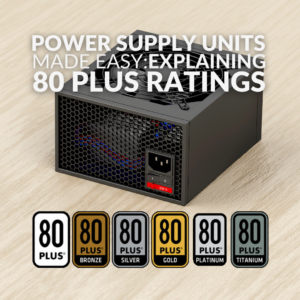
A PSU with a high 80 Plus Rating will be more energy-efficient.
80 Plus Rating is a certification that all power supplies have. At a minimum, a PSU needs to perform at 80% energy efficiency at 20%, 50%, and 100% loads. There are six different ratings. For maximum energy-efficiency, you want to invest in a high rating, such as gold, platinum, or titanium.

Phanteks AMP GH 1000W V2 ATX 3.1 PCIe 5.1 80 Plus Platinum Modular Power Supply
POW-PHK-05991
£132.90 GBP
(incl. VAT)
FREE SHIPPING
in stock
ADD TO BASKET
CORSAIR WS3000 ATX 3.1 Fully Modular Workstation Power Supply – CP-9020312-EU
POW-CRS-09181
£419.95 GBP
(incl. VAT)
FREE SHIPPING
in stock
ADD TO BASKETIf you want an in-depth explanation of power supplies and 80 PLUS Ratings, then check out our dedicated blog post.
CPU
When selecting a CPU, look out for those with a low TDP. TDP stands for Thermal Design Power and refers to the amount of heat generated. If your CPU has a low TDP, it won’t require as much power or cooling for it to perform at its best.

Intel Core I5-13400F (Raptor Lake) Socket LGA1700 Processor – Retail
CP-6BB-IN
£209.99 GBP
(incl. VAT)
FREE SHIPPING
out of stock
ADD TO BASKET
AMD Ryzen 5 7600 Six Core 5.10GHz (Socket AM5) Processor – Retail
CP-3DW-AM
£179.99 GBP £ 169.99 GBP
-5.56%(incl. VAT)
FREE SHIPPING
in stock
ADD TO BASKET
Intel Core I5-12400 2.50GHz (Alder Lake) Socket LGA1700 Processor – Retail
CP-6AL-IN
£199.99 GBP
(incl. VAT)
FREE SHIPPING
in stock
ADD TO BASKETAPU
Another way to reduce your gaming PC’s power consumption is to choose an APU. An APU is a processor that has integrated graphics. These are especially good for those who are only looking to use their computer for more casual games, instead of intensive AAA titles.

AMD Ryzen 5 8500G Six Core 3.5GHz (Socket AM5) APU With Radeon 740M Graphics
PRO-AMD-01798
£169.99 GBP
(incl. VAT)
FREE SHIPPING
in stock
ADD TO BASKET
AMD Ryzen 7 5700G Eight Core 3.8GHz (Socket AM4) APU With RX Vega Graphics – Retail
CP-3CV-AM
£239.99 GBP
(incl. VAT)
FREE SHIPPING
in stock
ADD TO BASKET
AMD Ryzen 5 8600G Six Core 4.3GHz (Socket AM5) APU With Radeon 760M Graphics
PRO-AMD-01797
£179.99 GBP
(incl. VAT)
FREE SHIPPING
in stock
ADD TO BASKETSSD
Whilst traditional HDDs use mechanical moving parts, a Solid State Drive (SDD) has an integrated memory circuit. The lack of moving parts makes SSDs notably more energy-efficient compared to hard drives. They don’t require as much power or electricity to perform. For example, a 10TB hard drive will use four times the amount of power compared to a 10TB SDD.

WD Black SN7100 2TB SSD NVME M.2 2280 PCIe 4.0 Solid State Drive
STO-WDC-04135
£399.95 GBP £ 289.99 GBP
-27.49%(incl. VAT)
FREE SHIPPING
in stock
ADD TO BASKET
KIOXIA EXCERIA 2TB SSD NVME M.2 2280 PCIe 4.0 Solid State Drive
STO-KIO-07150
£299.99 GBP £ 239.99 GBP
-20%(incl. VAT)
FREE SHIPPING
in stock
ADD TO BASKETTop Tips for Reducing Energy Consumption
Keep Your PC Clean
A dusty PC is at risk of overheating and drawing more power. Keeping a clean and dust free PC reduces the risk of any performance loss or damage to your components. Along with your wallet!
If you’re looking for some great tips on keeping your set-up clean and tidy, be sure to check out our ultimate hub.

Is it Time to Ditch the RGB?
To help reduce your energy consumption it might be time to get rid of that RGB lighting.
Whilst we think it’s an absolute must, RGB lighting does require a little power. It might be time to turn off your rainbow wave in order to reduce your electricity bill.
Close All Background Apps
A quick and simple trick to reduce your gaming PC energy consumption is to close all unwanted background tasks. Not only does this improve your computer’s performance, but it also helps to reduce how much power your CPU is drawing.
Tweak Windows Settings
There are some simple fixes and changes you can make in Windows 11 to help improve your computer’s efficiency.
In Windows 11 you can configure the power plan settings to adjust when your PC turns off after a period of inactivity. What’s more, you can choose between two different settings, Balanced or Best Performance. Balanced is ideal for those who are using their computer for work, web browsing, or watching content online. Whereas, Best Performance, is suited for gamers. Along with this, there is a dedicated ‘Power Saver’ plan, which reduces consumption and saves energy by reducing the performance of your PC whenever possible.
How Much Electricity Does a Gaming PC Use FAQ
How much electricity does a gaming PC use per hour?
With an 80 PLUS Gold PSU, it costs around 10p to run a gaming PC for an hour in the UK. This entirely depends on the hardware you are using, the games you are playing, and what times you game though.
Does a high-end gaming PC use more electricity than a standard PC?
A high-end gaming PC will use more electricity than an entry-level gaming PC because the internal hardware requires more power to run. This can be combatted by using a high-end PSU that reduces the amount of wasted power.
What PC components use the most electricity when gaming?
The GPU and CPU are the most power-hungry components in a PC as they require the most power draw to conduct their regular operations.
How can I reduce my gaming PC’s electricity consumption?
Reducing your PC’s electricity consumption can be done via switching out the PSU for a more power-efficient model, utilising more power-efficient internal hardware, and building inside a case with good airflow to minimise the amount of fans you need to run.
Does a more efficient PSU reduce gaming PC electricity costs?
A more efficient PSU definitely reduces a gaming PC’s electricity cost. The most power efficient consumer PSUs come with an 80 PLUS Titanium rating, offering the least amount of energy waste.
More Energy Efficient PC Set-Up Tips
On the OCUK blog, we have loads of content on how to make your gaming set-up the most energy-efficient it has ever been! Take a look at our recommended blogs below to find out more.


Your Top Tips?
Do you have any top tips for reducing your energy consumption? Have you found ways to reduce how much it costs to run your gaming PC? Leave them in the comments below.
- 8 min read


Ruth Rowley
Author
Ruth has been with Overclockers UK for over four years and has gone on to write about everything ranging from in-depth hardware guides to monthly game releases.
Outside of writing blog posts, she can be found wrapped in a blanket with her black cat, engrossed in a book or playing life-simulation games such as The Sims, Stardew Valley, and Animal Crossing.
Read More >>