
On the fence about whether water-cooling is for you? Or, perhaps you’ve already decided, but you need more clarity on how to water-cool a PC using these parts? Whatever the case, this complete guide to water-cooling components will detail everything you need to know


We’ve broken down what water-cooling is, covering all the individual components, detailing what they do, and why you need it in your custom loop.
What is Water-Cooling?
Water-cooling is a type of liquid cooling solution designed to draw and dissipate heat from within your PC. Put simply, this is achieved by circulating a coolant throughout various tubing and components to remove unwanted heat and maintain optimum temperatures.
What Components Do I Need for Water-Cooling?
If you’re researching how to water-cool a PC, understanding the purpose of each component is the perfect place to start.
A standard water-cooling loop will usually consist of the same core components. This includes:
- Fans (optional)

What Does a Pump Do in a Water-Cooled PC?
In a water-cooling loop, the pump is the ‘heart’, responsible for circulating all the coolant throughout the entire system. It’s connected to various components, such as the radiator, CPU, and GPU, via the tubing.
Without the pump, the coolant wouldn’t move, and therefore, heat would get trapped within your hardware. This causes temperatures to increase and your PC to throttle.
There are different types of pumps, including:
- D5
- DDC
- Combo

D5
A D5 pump is ideal for enthusiast builders looking to create a more complex custom cooling loop. These pumps often feature a cylindrical design that is housed in a large exterior shell, making them suitable for both mid-tower and full-tower cases. Optimised to deliver high flow rates with minimal noise, D5 pumps are perfect for pushing large amounts of coolant through GPU water blocks, long tubing, and even multiple radiators.
DDC
A DDC pump offers the same performance level as a D5, but in a smaller space-saving form factor. As a result, a DDC pump is ideal for those looking to craft an SFF PC that doesn’t compromise on performance. However, a DDC does produce slightly more noise, especially when under heavy loads.
Combo
Combo pumps integrate both the pump and reservoir into one singular unit. This helps reduce the number of components required to instal within your custom loop and simplifies installation. A combo pump is available as either D5 or DDC, suitable for both enthusiast and beginner builders alike.
What is the Water Block in a Water-Cooled PC?
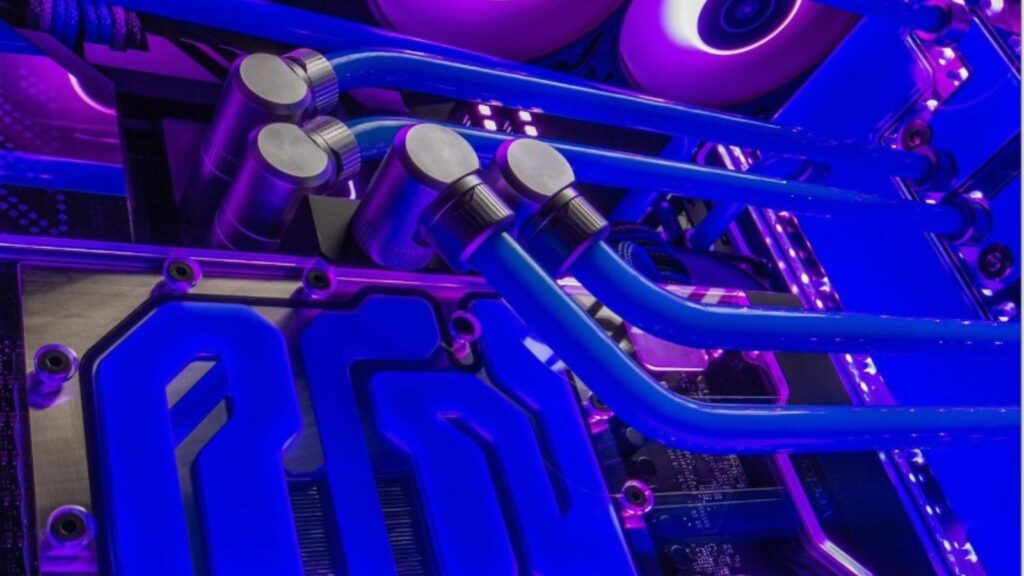
The water block attaches to various components, such as the CPU or GPU, to transfer unwanted heat into the coolant. A water block typically consists of a metal base, usually copper, and a series of specialised micro-channels or fins. These help to maximise surface area, quickly transferring heat into the liquid coolant.
By transferring heat to the coolant, a water block enables the rest of the loop to effectively cool your PC, facilitating optimum temperatures and stable performance.
There are various types of water blocks. The most common include:
- CPU blocks
- GPU blocks
- Monoblocks
- M.2 SSD blocks
CPU Block
Just as the name suggests, these water blocks are designed to help maintain your CPU temperatures. Most CPU blocks can be mounted on top of the processors IHS and are easy to install. Alternatively, you can also find CPU blocks that can be mounted directly to the processor die. However, these can be quite complex, making them more suited for enthusiasts or experienced builders.


GPU Block
A GPU block cools the graphics card and has been designed to replace the existing thermal solution found with your GPU. As a result, you will be required to make some modifications to your graphics card. A GPU block will cool both the graphical processor and VRAM modules, ensuring these vital components remain cool and stable.
Monoblock
A monoblock cools your processor and the components surrounding the CPU socket. These water blocks are typically larger than your standard CPU block, but they utilise the same mounting hardware. Since they simultaneously cool both the CPU and surrounding hardware, a monoblock is suitable for overclocking as it facilitates more stable power delivery to your processor.


M.2 SSD Block
An M.2 SSD block is designed to work alongside the latest generation of M.2 SSDs. Built to keep your storage solution cool and operating at optimum temperatures, these water blocks reduce the risk of thermal throttling and facilitate faster read/write speeds.
What is a Reservoir in a Water-Cooled PC?
The reservoir is responsible for storing all the liquid coolant, acting as a central hub. Since the reservoir ensures a direct supply of coolant always flows into the pump, it reduces the risk of the pump becoming dry or damaged. Reservoirs also help to streamline any maintenance, allowing for simple filling and bleeding.
There is a wide range of shapes and sizes, each boasting various mounting options. The most common include:
- Tube
- Box-style or flat
- Combo

Tube
Tube reservoirs are tall and cylindrical, often serving as a stylish focal point and high-capacity coolant chamber. These reservoirs are suitable for mid- and full tower PC cases that offer ample vertical mounting options.
Box-Style
Box-style or flat reservoirs are more compact, perfect for cases that have limited internal space. These can be mounted behind distro plates; however, due to their smaller form factor, they hold less coolant compared to a tube reservoir.

Combo
Combo units include both a pump and a reservoir. This reduces the number of tubing runs, simplifying the overall design of your cooling loop. Perfect for beginners or those looking to create a sleek, clean aesthetic.
What Does the Radiator Do in a Water-Cooled PC?
The radiator transfers any unwanted heat into the integrated fans, helping to cool down the liquid coolant. A radiator typically consists of a series of channels and fins through which the coolant flows, while onboard fans blow cold air across the fins to transfer excess heat from the liquid into the surrounding air. This notably drops coolant temperature, allowing it to circulate back through the loop, absorb more heat, and cool the system all over again.

All of this is housed inside a protective outer shell that features several mounting points to attach to the interior of your PC case, along with space for fans. What’s more, a radiator will also typically feature inlet and outlet ports for any tube fittings.
What is Tubing in a Water-Cooled PC?
The tubing is what connects the entire loop together. The liquid coolant flows throughout the tubing, ensuring it reaches every component of the custom loop, transferring any unwanted heat.
Tubing is available in both soft and hardline variants.
Soft Tubing
Soft tubing is constructed from flexible materials such as PVC or silicone, which makes it easier to bend and route to those hard-to-reach spaces. All without requiring any specialised tools. Soft tubing also utilises barbed or compression fittings to secure connections, minimising the risk of leaks.


Hard Tubing
Alternatively, hard tubing is generally made from acrylic or PETG. This type of tubing does require specialised tools such as tube cutters and bending kits to shape and conform the tubes to their exact size and fit. This makes hard tubing more challenging to work with; however, it does boast incredible durability.
What Are the Fittings in a Water-Cooled PC?
The fittings connect the tubing to your hardware. Water cooling fittings typically consist of specialised connectors that create water-tight seals between the tubing and component, helping to prevent any unwanted leaks.
There are different types of fittings, including:
- Compression
- Barbed
- Rotary


Compression
Compression fittings consist of a base, O-rings, and a collar. The threaded collar, once tightened, compresses the tubing against the O-rings, holding them securely in place. Compression fittings can be used with both soft and hard tubing.
Barbed
Barbed fittings are primarily used with soft tubing. These fittings feature a dedicated barb that is inserted into the tubing, and a physical clamp or collar that holds the tubing in place.


Rotary
Alternatively, rotary fittings have a rotating collar that allows you to twist and angle your connection without putting excess strain on the tubing. Perfect for compact custom loops or builds with limited space.
What is the Liquid Coolant in a Water-Cooled PC?
The coolant is what flows throughout the tubing, absorbing any unwanted heat away from your components. Liquid coolant typically consists of distilled water, providing incredible thermal conductivity. This is often mixed with anti-microbial additives to prevent corrosion and any nasty build up.

There are coolants that come pre-mixed for convenience or variants that you can mix yourself. If the colour doesn’t suit your aesthetic, there are also dyes that can be added without affecting the coolant’s thermal performance.
Water-Cooling vs AiO – What’s the Difference?
Water-cooling vs AiO – which one should you opt for, and is there even a difference?!
There aren’t a lot of significant differences between an AiO and a custom water-cooling loop.

An AiO, or All-in-One, is a type of water-cooling. It combines all the core elements of a custom loop into a singular unit. All the components within the AiO work together to draw and dissipate unwanted heat away from your processor. However, since everything is contained in one unit, AiOs are much more beginner-friendly and easier to install.
Whilst an AiO can achieve a similar level of performance to a custom loop, they aren’t suitable for those looking to create an enthusiast build or workstation. In these scenarios, a custom water-cooling loop is best.

Ultimately, what cooling solution you pick depends on your individual preferences. If you’re a beginner who still wants to harness water-cooling, an AiO is perfect. However, for an enthusiast builder, demanding unparalleled performance without compromise, it has to be a custom loop.
Want to learn about AiO coolers and why you want one? Our blog guide details everything you need to know.

Ready to Upgrade to Water-Cooling?
Decided that water-cooling is for you? At Overclockers UK, we stock everything you need to build the custom water-cooling loop of your dreams. This includes compatible cases, all the fittings, core components, and much more.
If you don’t quite want to build your own PC with a custom loop, we also stock a great range of gaming PCs and workstations that harness water-cooling. Win, win, win.

EK Water Blocks EK-Quantum Kinetic TBE 200 D5 PWM D-RGB Pump / Reservoir Combo – Acetal
WC-9WS-EK
£179.99
(incl. VAT)
FREE SHIPPING
in stock
ADD TO BASKET
Phanteks EZ-FIT 360 Radiator – White
COO-PHK-03500
£86.99
(incl. VAT)
FREE SHIPPING
in stock
ADD TO BASKET
Corsair Hydro X Series XT Hardline 12mm Tubing 3 X 1m – Satin Transparent
WC-033-CS
£17.99
(incl. VAT)
FREE SHIPPING
in stock
ADD TO BASKETLearn More About Water-Cooling


Do You Use Water-Cooling?
Feeling more confident about how to water-cool a PC now that you know the role of each component? Are your familiar with water cooling, and have tips or hardware recs to share? Leave them in the comments below.
- 10 min read


Ruth Rowley
Author
Ruth has been with Overclockers UK for over four years and has gone on to write about everything ranging from in-depth hardware guides to monthly game releases.
Outside of writing blog posts, she can be found wrapped in a blanket with her black cat, engrossed in a book or playing life-simulation games such as The Sims, Stardew Valley, and Animal Crossing.
Read More >>