
Roll back the credits, we’re here with everything you need to know about rolling back your GPU drivers. This simple hardware tweak can fix any unexpected update issues and help to get you back to the more important things – like securing that victory on the virtual battlefield.

We won’t keep you waiting any longer, here’s how you roll back your graphics drivers.
Why Do You Need to Roll Back Graphics Drivers?
Whilst updating your GPU drivers can bring plenty of performance enhancements, it might also result in unexpected issues. That’s where rolling back your graphics drivers comes in! Rolling back your drivers simply reverts them to the previous version to hopefully fix any issues you may have uncovered.
Will Rolling Back Drive Updates Affect Your GPU?
Rolling back GPU drivers can help to fix any issues after an update failure. However, since you are reverting to an outdated version, you won’t be able to take advantage of any new performance enhancements featured with the latest updates.
This can result in a notable drop in your games with sudden lag, poor FPS, and slow speeds breaking up your in-game immersion.
How to Roll Back Graphics Drivers
There are a couple of ways in which you can successfully roll back your graphics drivers. This can include the more generalised method of using Windows 10 or Windows 11 device manager for NVIDIA or Intel GPUs. Or you can download and install specific software for AMD graphics cards that give you a bit more control. Here’s everything you need to know.
Rolling Back Drivers Using Windows 10 or Windows 11
The easiest way to roll back your GPU drivers is through the Device Manager, available in both Windows 10 and 11.
Simply search for ‘Device Manager’ in Start and begin by looking for Display Adapters in your list of components. Once you locate it, either select the arrow next to it or double-click to open the drop-down menu. You should be able to see your connected GPU in this list.
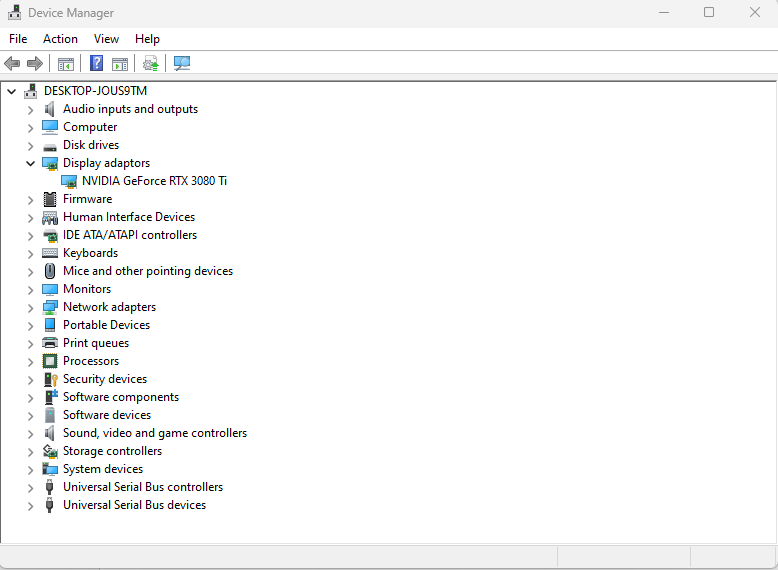
Right-click on the name of your GPU and select ‘Properties’. This will open up a new tab where you’ll then need to select the ‘Driver’ option at the top of the tab. After this, click ‘Roll Back Driver’, choose the reason why you want to roll them back, and then select ‘Yes’.
You’ll need to wait a few minutes for the drivers to successfully roll back, and your screen may turn black a few times during this process. Once the roll back has finished, you should see both the driver date and version change in the Device Manager.
Rolling Back AMD Graphics Drivers
To rollback AMD drivers, you may want to download and install AMD Software: Adrenaline Edition. This is a simple software suite that can help you revert to older AMD drivers, and AMD recommends utilising this application alongside the AMD Cleanup Utility for some extra added security. You can find the download page with a bit more info here (external link).
Rolling Back NVIDIA and Intel Graphics Drivers
When rolling back NVIDIA and Intel drivers, the two manufacturers actually recommend utilising the Windows 10 or Windows 11 OS as this is the most straightforward method. You can click here (external link) for NVIDIA, or here (external link) for Intel to find out their specified instructions.
If All Else Fails…
Still struggling with poor performance even though you’ve tried every bit of GPU troubleshooting? It might simply be time for an upgrade, and thankfully Overclockers UK has got your back! We’ve got plenty of premium GPUs available from both NVIDIA and AMD that are sure to boost your performance to a whole new level.
We’ve got our top two picks from NVIDIA and AMD below, but these GPUs don’t feature the power you need to render your favourite games, you browse the full range instead.

Gigabyte GeForce RTX 5070 Ti Eagle OC Ice SFF 16GB GDDR7 PCI-Express Graphics Card
GRA-GIG-04140
£1229.99 GBP
(incl. VAT)
FREE SHIPPING
in stock
ADD TO BASKET
Asus GeForce RTX 5080 Prime OC 16GB GDDR7 PCI-Express Graphics Card
GRA-ASU-03931
£1589.99 GBP
(incl. VAT)
FREE SHIPPING
in stock
ADD TO BASKET
Sapphire Pure Radeon RX 9070 XT Gaming OC 16GB GDDR6 PCI-Express Graphics Card
GRA-SPR-03982
£949.99 GBP
(incl. VAT)
FREE SHIPPING
out of stock
ADD TO BASKETYour Next Question Answered
Got a burning question about your graphics card? On the OcUK blog, we’ve got plenty of helpful guides all about GPUs. Check out a few of our faves below.


Thinking of Rolling Back Your Graphics Drivers?
If you’ve got any questions about rolling back your graphics drivers, let us know in the comments below! We’ll do whatever we can to help you out.
- 4 min read

Ruth Rowley
Author
Ruth has been with Overclockers UK for over four years and has gone on to write about everything ranging from in-depth hardware guides to monthly game releases.
Outside of writing blog posts, she can be found wrapped in a blanket with her black cat, engrossed in a book or playing life-simulation games such as The Sims, Stardew Valley, and Animal Crossing.
Read More >>
Thank you for sharing this! Now I can enjoy normal graphics & display again.
via GIPHY